In order to dynamically populate values in lightning:combobox using javascript we can create a list variable and push the values. We also require the values like ids associated to the particular option for back-end logic.
For example : If we want to show the list of contacts using lightning:combobox component where the option should display the contact name but the value should be the contact id which will be used for back-end logic
For this we can create a temporary Map variable in our lightning component and set the value and label parameters of the lightning:combobox.
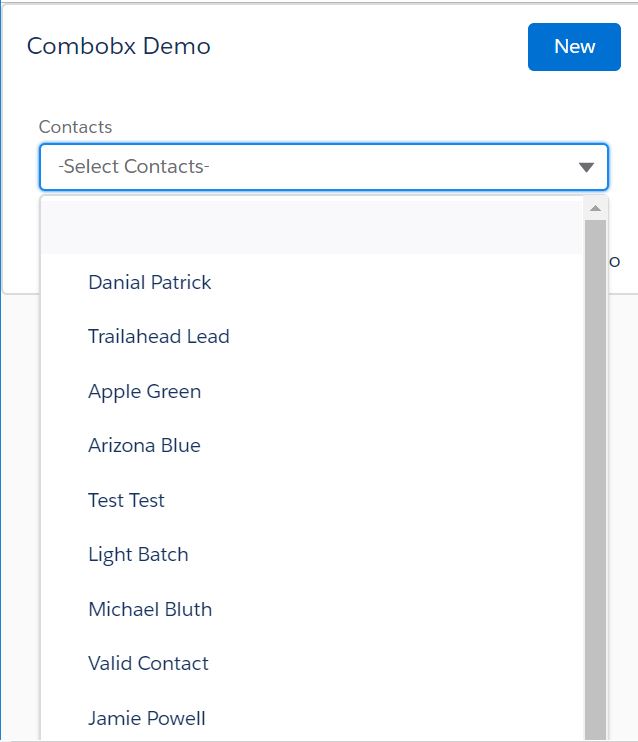
Here is the code for this component
Combo.app
<aura:application extends="force:slds" access="global"  description="Lightning Combo Demo">
 <c:Combo_Cmpt/>
</aura:application>
Combo_Cmpt.cmp
<aura:component implements="flexipage:availableForAllPageTypes" access="global" controller="ComboController">
<!-- attributes -->
<aura:attribute name="options" type="List" default="[]"/>
<aura:attribute name="TempMap" type="Map"/>
<!-- handlers-->
<aura:handler name="init" value="{!this }" action="{!c.init }"/>
  <lightning:card footer="Combobx Demo" title="Combobx Demo">
        <aura:set attribute="actions">
            <lightning:button variant="brand"  label="New"/>
        </aura:set>
        <p class="slds-p-horizontal_small">
            <lightning:layout multipleRows="true" verticalAlign="center">

            <lightning:layoutItem smallDeviceSize="12" mediumDeviceSize="6" largeDeviceSize="4" size="12" padding="around-small">
                <lightning:combobox name="Contacts"
                                    label="Contacts"
                                    value="All Contacts"
                                    placeholder="-Select Contacts-"
                                    options="{! v.options }"
                                    onchange="{! c.handleChange }"/>
            </lightning:layoutItem>
            </lightning:layout>
        </p>
    </lightning:card>
</aura:component>
Combo_CmptController.js({
init: function (cmp, event, helper) {
helper.getContactList(cmp);
},
handleChange: function (cmp, event) {
// This will contain the string of the "value" attribute of the selected option
var selectedOptionValue = event.getParam("value");
alert("Option selected with value: '" + selectedOptionValue + "'");
}
})
Combo_CmptHelper.js({
getContactList : function(cmp) {
var action = cmp.get('c.getContactList');
action.setCallback(this, $A.getCallback(function (response) {
var state = response.getState();
if (state === "SUCCESS") { // create a attribute of type map to store the map values returned
// from the controller (ComboController )
var myMap = cmp.get("v.TempMap");
var myOptions = [];
if(myMap == null){
myMap = {};
}
myMap = JSON.parse(JSON.stringify(response.getReturnValue()));
console.log('myMap '+myMap);
// iterate the map for key and value
for(var cont in myMap){
// populate the list with the required JSON format
myOptions.push({label:myMap[cont], value:cont});
}
console.log('myOptions '+myOptions);
// set the options to the combobox
cmp.set("v.options", myOptions);
} else if (state === "ERROR") {
var errors = response.getError();
console.error(errors);
}
}));
$A.enqueueAction(action);
}
})
ComboController.apxc
public class ComboController {

    @AuraEnabled
    public static Map<String,String> getContactList(){

   Map<string,string> contactOptions= new Map<string,string>();
      List<Contact> contList = [Select Id, Name From Contact Limit 10];

      contactOptions.put('','-Select One-');
      for(Contact contStr : contList) {
            contactOptions.put(contStr.Name,contStr.id);
      }
      System.debug('contactOptions >>>>>> '+contactOptions);
      return contactOptions;

    }
}
Comments
Post a Comment